Split dictionary into multiple dictionaries

Dictionary is the generic collection of key-value pairs and belongs to System.Collection.Generic namespace.

The .Net framework does not provide any built-in method to split the dictionary object into multiple dictionary objects of predefined sizes. So it can be achieved only by writing custom code that can break the dictionary into smaller pieces.

Let us consider a requirement to split a dictionary object having 31 key-value pairs into multiple dictionaries with each dictionary having 5 key-value pairs. Below code snippet breaks the dictionary into 7 chunks having 5, 5, 5, 5, 5, 5, 1 key-value pairs and adds them into List collection:
private List<string, string> SplitDictionary(IDictionary<string, string> dict, int size)
{
   int counter = 0;
   List<Dictionary<string, string>> result = dict
      .GroupBy(x => counter++ / size)
      .Select(g => g.ToDictionary(h => h.Key, h => h.Value)
      .ToList();
   return result;
}
With the help of foreach loop we can pick each chunk and do further processing or pass it as a parameter to any method.

We can directly pass the dictionary chunk to any method as a value type but cannot pass as a reference type. It is because the dictionary chunk is created from foreach loop and hence is not mutable.

Each dictionary chunk can be converted to a reference type by assigning it to a new dictionary object and then use a new dictionary object as a reference type.

Let us consider a dictionary object named "results" having IDictionary<string, string> signature. This code snippet can be used to pass the dictionary chunks to any method as reference type:
List<Dictionary<string, string>> chunks = SplitDictionary(results, 5);
foreach (var chunk in chunks)
{
   Dictionary<string, string> intermediate = chunk;
   CustomMethod(ref intermediate);
}
The intermediate object above uses the dictionary chunks as a reference type.

Detect hanged process in .Net

We often create a child thread from the main .Net application to process a long-running task independently. Till the thread execution is not complete the main program's job is not done.

If the task running on a separate thread is a complex process having a dependency on other components then there is a high probability of such a task getting hanged. Hence the task can be considered as hanged if its execution takes longer than expected. In case the task has hanged we must release all the resources allocated to it by killing the task instead of waiting for an indefinite time. So the question is how to determine any hanged process running on a separate thread and kill it automatically?

To address this situation we can write a custom algorithm that monitors the running thread at regular intervals and collect a snapshot of memory usage. Based on ideal memory usage for a task we can also specify the ideal memory usage threshold to compare it against the difference in memory snapshots. The threshold value can be assigned in bytes and must be a sizable number as minor fluctuations always happen in memory usage.

Various parameters like virtual memory, working set and private memory can be used to measure memory utilized by any process. We can collect such data into a custom Snapshot object to compare variations at different intervals.


private class Snapshot
{
   long VirtualMemory { get; set; }
   long PeekVirtualMemory { get; set; }
   long WorkingSet { get; set; }
   long PeekWorkingSet { get; set; }
   long PrivateMemory { get; set; }
}

.Net has a built-in Process.GetCurrentProcess() method that can be called from the child thread to collect a snapshot of memory usage statistics:


private Snapshot ReadMemoryStatistics()
{
   MemoryStats stats = new MemoryStats();
   var p = Process.GetCurrentProcess();
   stats.VirtualMemory = p.VirtualMemorySize64;
   stats.PeekVirtualMemory = p.PeekVirtualMemorySize64;
   stats.WorkingSet = p.WorkingSetSize64;
   stats.PeekWorkingSet = p.PeekWorkingSetSize64;
   stats.PrivateMemory = p.PrivateMemorySize64;
   
   return stats;
}
Snapshots collected from the running thread at different intervals can be used to determine if there is any expected variation in memory usage. If the memory usage continues to remain below our threshold limit till the specified duration then we can consider the process as hanged and kill the child thread to release all the resources. The below code snippet demonstrates to check the running thread every two minutes and kill the thread after 20 minutes if memory usage doesn't exceed the threshold.

//Run any complex task on a separate thread
var process = new Thread(() => returnValue = DoProcessing());
process.Start();

//Collect initial snapshot of memory
var initialSnapshot = ReadMemoryStatistics();
var startTime = DateTime.Now();

//Specify interval after which memory usage should be compared with initial snapshot
int interval = 2;
int totalIntervals = 10;
int intervalCounter = 0;

//Specify memory threshold values
long vmThreshold = 1000000;
long wsThreshold = 1000000;

//Ping the thread every minute until it reaches our interval limit
while (!process.Join(60000))
{
   currTime = DateTime.Now();
   if ((currTime - startTime).ToMinutes() > interval)
   {
      var currentSnapshot = ReadMemoryStatistics();
      long vmDifference = currentStats.VirtualMemory - initialStats.VirtualMemory;
      long wsDifference = currentStats.WorkingSet - initialStats.WorkingSet;
      
      // Memory usage not exceeding our threshold limit indicates process is hanged and can be killed.
      if (Abs(vmDifference) > vmThreshold || Abs(wsDifference) > wsThreshold)
      {
         // Reset counters as memory usage indicate that the thread is still alive
         initialSnapshot = currentSnapshot;
         startTime = currTime;
         intervalCounter = 0;
      }
      else if (intervalCounter < totalIntervals)
      {
         intervalCounter++;
      }
      else
      {
         // Kill the thread
      }
   }
}


Encrypt or decrypt sensitive data in Web.config

It is a very common practice to encrypt sensitive data in configuration files. This can be either database connection strings, public key, private key or credentials that need to be kept secure. As this secure data cannot be hard-coded into the application code, so it is stored in configuration files to facilitate modifying them at frequent intervals.

Configuration files used by ASP.NET applications are named as Web.config whereas Windows applications have App.config file. Though there are several symmetric and asymmetric algorithms available in the market, the .Net framework provides an out-of-the-box feature to encrypt and decrypt configuration file or its section.

Let's consider an appSettings section of App.config that needs to be encrypted:

<?xml version="1.0" encoding="utf-8" ?>
<configuration>
  <startup> 
    <supportedRuntime version="v4.0" sku=".NETFramework,Version=v4.8" />
  </startup>
  <appSettings>
    <add key="DbPassword" value="Test12345" />
  </appSettings>
</configuration>

Below code snippet does the encrypt to Cipher text using DataProtectionConfigurationProvider:
private void btnEncrypt_Click(object sender, RoutedEventArgs e)
{
  Configuration config = ConfigurationManager.OpenExeConfiguration(
                System.Reflection.Assembly.GetExecutingAssembly().Location);
  ConfigurationSection section = config.GetSection("appSettings");
  if (!section.SectionInformation.IsProtected)
  {
    section.SectionInformation.ProtectSection("DataProtectionConfigurationProvider");
    config.Save();
  }
  MessageBox.Show(ConfigurationManager.AppSettings["DbPassword"]);
}

Once encrypted, the content of appSettings will not be readable to the user. However .Net code will still be able to read it in its original form. Below is an example of the encrypted appSetting section:

<?xml version="1.0" encoding="utf-8" ?>
<configuration>
    <startup> 
        <supportedRuntime version="v4.0" sku=".NETFramework,Version=v4.8" />
    </startup>
    <appSettings configProtectionProvider="DataProtectionConfigurationProvider">
        <EncryptedData>
            <CipherData>
                <CipherValue>AXAAANMCdndereAwedwDC/C1................................</CipherValue>
            </CipherData>
        </EncryptedData>
    </appSettings>
</configuration>

As and when required the encrypted section can be easily decrypted into its original form. This can be achieved by the below piece of code:
private void btnDecrypt_Click(object sender, RoutedEventArgs e)
{
  Configuration config = ConfigurationManager.OpenExeConfiguration(
                System.Reflection.Assembly.GetExecutingAssembly().Location);
  ConfigurationSection section = config.GetSection("appSettings");
  if (section.SectionInformation.IsProtected)
  {
    section.SectionInformation.UnprotectSection();
    config.Save();
  }
  MessageBox.Show(ConfigurationManager.AppSettings["DbPassword"]);
}

Advanced interview questions on .Net

This article lists the set of interview questions along with a short explanation. These questions are applicable to senior developers as they are based on advanced .Net concepts.

Q) What is Dependency Injection?
When a classA uses methods of classB then it means classA has a dependency of classB. To access methods of classB, the classA need to create an object of classB. Transferring the task of creating an object to someone else and directly using the dependency is called dependency injection.
So it is the dependency injection's responsibility to:
- Create the objects
- Know which class requires those objects
- And provide them with all those objects

Three types of dependency injection are:
- constructor injection
- setter injection
- interface injection

Benefits of dependency injection are:
- Helps in unit testing
- Extending the application becomes easier
- Helps to enable loose coupling

Unity and Castle Windsor frameworks facilitate in implementing dependency injection in .Net applications.

Q) What is IoC?
Inversion of Control (IOC) states that a class should not hardcode dependencies of another class but should be configured by some other class from outside.

It is the fifth S.O.L.I.D. principle according to which a class should concentrate on fulfilling its responsibilities and not on creating objects that it requires to fulfil those responsibilities. Dependency injection comes into play where it provides the class with the required objects.

Q) What is Message-driven architecture?
Message Driven Architecture (MDA) is composed of autonomous systems that communicate with each other via messages. It is very common in a distributed application where each component sits on a different server but they need to work together.

Consider there are three systems: Sales, Accounting and Inventory which are decoupled and hosted on different servers though they need to communicate with each other. This can be achieved by a transporter called ServiceBus having sole responsibility to deliver messages to the destination. Hence the sender and receiver don't know about each other, then only know about ServiceBus.

ServiceBus in an MDA architecture works like this:
- Source application sends a message to ServiceBus.
- ServiceBus delivers the message to the destination application.
- Destination application receives and handles the message.

Examples of ServiceBus are ESB, MuleSoft and Azure Service Bus. Messages handled by Azure Service Bus are stored in Azure Queue Storage and delivered asynchronously to the target system.

Q) What is CORS and its use?
Cross-Origin Resource Sharing (CORS) is a mechanism that enables access to resources located outside of its domain. An example of a cross-origin request is: JavaScript in a webpage located on http://siteA.com uses XMLHttpRequest to make a request to JSON resource from http://siteB.com/sample.json

It is the default behaviour of browsers to restrict the cross-origin requests initiated from front-end scripts. For example, XMLHttpRequest follows the same-origin policy by default. Hence any request from a webpage of one origin can only load resources of the same-origin unless the resources from other origin include the right CORS headers. It means the additional HTTP headers must be passed to the response from siteB:

<customHeaders>
  <add name="Access-Control-Allow-Origin" value="http://siteA.com" />
  <add name="Access-Control-Allow-Headers" value="Content-Type" />
  <add name="Access-Control-Allow-Methods" value="GET, POST, PUT, DELETE, OPTIONS" />
</customHeaders>


Q) What is the use of Entity Framework?
It is an Object Relational Mapping (ORM) that enables developers to work with a database using .Net objects. It eliminates the developers to write a data-access code. It can be implemented with either Code-First or Database-First approach which creates a DbContext file to establish a connection to the database, query the database and close the connection.

Q) Which testing framework is better to use for .Net applications?
Microsoft provides an MSTest framework for unit testing that now ships with Visual Studio out-of-the-box. The tags [TestClass] and [TestMethod] specified on top of the class or method definition indicate them as test objects. The dedicated UI panel to view the tests can be navigated from Test --> Windows --> Test Explorer.

Test Analyze


Running the tests from Visual Studio is also straight forward - just right click on any [TestMethod] and select Run Tests.

Run Test


Other useful tags are [TestInitialize] and [TestCleanup] that allows us to specify the code that is run before (initialize) and after (cleanup) any individual test is run.

NUnit framework is also widely used testing framework. It also uses a very similar style just like  Visual Studio's testing framework, but it refers to [TestClass] as a [TestFixture] and [TestMethod] as a [Test].

Various Assert statement are required to compare the expected outcome with the actual outcome:
- Assert.IsTrue(x)
- Assert.IsFalse(x)
- Assert.AreEqual(x, y)
- Assert.IsNull(x)
- Assert.IsNotNull(x)

A mocking framework like NSubstitute is also very useful while writing unit tests. It is used to mock any object by using its interface and return mocked object having specified test data. Below code snippet represents mocking of the object in the test method:

using Microsoft.VisualStudio.TestTools.UnitTesting;
using NSubstitute;

[TestClass]
[ExcludeFromCodeCoverage]
public class EmployeeControllerTest
{
    private EmployeeController _controller;
    private EmployeeTestData _testData;
    private IEmployeeLogic _searchEmployeeLogic;

    [TestInitialize]
    public void Setup()
    {
        _searchEmployeeLogic = Substitute.For<IEmployeeLogic>();
        _controller = new EmployeeController(_searchEmployeeLogic);
    }

    [TestMethod]
    public void Should_Redirect_To_Details_View()
    {
        _searchEmployeeLogic.GetSearchEmployeeDetails(Arg.Any<GetSearchEmployeesRequest())
                .Returns(value => _testData.GetSearchEmployeesResponse());
        var actionResult = _controller.GroupSearch(_testData.GroupSearchEmployee)) as RedirectToRouteResult;
        Assert.IsNotNull(actionResult);
    }
}

Q) What is serialization?
Serialization is the process of converting an object into an array of bytes.
Serialization
It is used to transmit the object to a remote application through a firewall as a JSON or XML string. The serialized object can be stored in a database, memory or file.

Q) What types of HTTP methods are available for Web API?
Web API supports four types of HTTP methods. They are assigned to web methods in the form of [HttpGet], [HttpPost], [HttpPut] or [HttpDelete] attributes.

Q) How can you implement Windows authentication to AngularJS or ReactJS app using Web API?
Windows authentication allows the user to bypass the authentication popup by using credentials stored in the Integrated Windows Authentication cookie. This can be implemented by following below steps:

  1. Create a new IIS Website
  2. Create IIS Application under this website
  3. Set the path of AngularJS or ReactJS app in the virtual directory folder
  4. Set authentication mode as Windows in both IIS Website and IIS Application
  5. Add an attribute [Authorize] on the Web API class


Q) How can you write an asynchronous program?


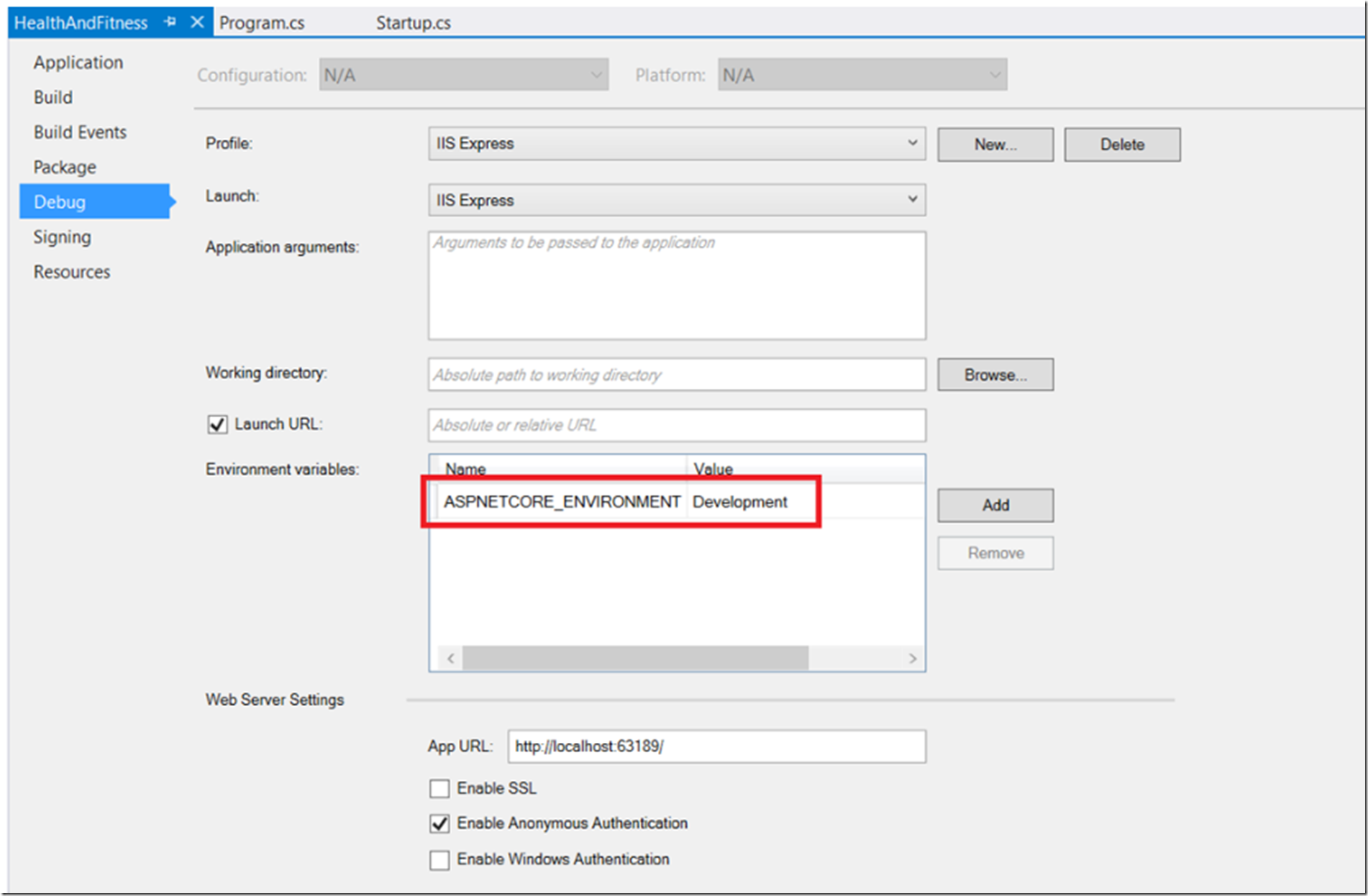
Q) How can you configure the response for env.IsDevelopment() method?
The value of env.IsDevelopment() method is determined from ASPNET_ENV environment variable. If its value is set as "Development" then env.IsDevelopment() returns True otherwise False.
.Net Core fetches this value out-of-the-box from environment variable using Microsoft.AspNet.Hosting.HostingEnvironmentExtensions.cs file. This environment variable can also be modified from Debug tab of project properties:

The ASPNETCORE_ENVIRONMENT value overrides DOTNET_ENVIRONMENT value. IHostEnvironment.EnvironmentName can be set to any value, but the following values are provided by the framework: 
  • Development : The launchSettings.json file sets ASPNETCORE_ENVIRONMENT to Development on the local machine. 
  • Staging 
  • Production : The default if DOTNET_ENVIRONMENT and ASPNETCORE_ENVIRONMENT have not been set.

Q) Difference between #if DEBUG and if(env.IsDevelopment())
Q) How can you call base class contructor from derived class in C#?
This can be achieved by add ": base(<parameter>)" in the constructor of derived class. This will force the parameterized base class contructor to call first.

Q) How can you prevent a base constructor from being called by derived class in C#?
If you do not explicitly call any constructor in the base class, the parameterless constructor will be called implicitly. There's no way around it, you cannot instantiate a class without a constructor being called.
Constructors are public by nature. Do not use a constructor and use another function for construction and make it private, so you that you can create an instance with no paramters and call that function for constructing your object instance.

Q) How can you use a one Windows Service to trigger different tasks on different schedule?
Windows Service runs in background as a listener on the specified port/path and triggers if any request is arrived. We can use REST API as a trigger Windows Service. Hence, different REST APIs within a same Windows Service can be used to run different tasks on different threads using System.Threading.Task library. However, to trigger different tasks on different schedule, it is ideal to create a Console app with below features:
  • Create a Console app that use command-line parameters
  • Run a specific task based on the command-line parameter
  • Create multiple Windows Task Schedulers to run same Console app with different set of input parameters. Quartz can also be used as scheduling tool in C#.

Q) Can we use "this" keyword in a static method?
In a static method, we can access only static properties and static methods. So, we cannot use "this" keyword within a static method because "this" keyword refers to the current instance of the class. However, we can use Extension method in a static class to use "this" keyword.

Resolve domain certificate error in Selenium

Selenium webdriver loads the webpages and navigate automatically as scripted. Some of the popular web-drivers are of ChromeDriver, FirefoxDriver, IWebDriver and PythonJS. Though PythonJS is becoming out-dated it is still considered one of the fastest web-driver to run in the background.

Domain certificates are often not taken seriously for Test environments and the development continues even if this certificate is expired. Though the website will work correctly, the certificate icon in the browser will highlight this issue.

If your website is hosted in a Test environment where the domain SSL certificate is expired then automation scripts fail due to an invalid certificate error. This issue doesn't resolve by changing the web-driver but can only be fixed by adding driver options into your web-driver to bypass such certificate errors. Below piece of code shows the use of ChromeDriver to ignore certificate errors:

ChromeOptions = new ChromeOptions();
option.AddAgrument("headless");
option.AddAgrument("disable-gpu");
option.AcceptInsecureCertificates = true;
option.AddAgrument("ignore-certificate-errors");
option.AddAgrument("windows-size=1280,1024");
option.AddAgrument("no-sandbox");

ChromeDriver driver = new ChromeDriver();
driver = new ChromeDriver(option);
driver.Navigate().GoToUrl("<<websiteUrl>>");

Windows authentication popup issue can be resolved by implementing Impersonation in web-driver.

Handle authentication popup in Selenium on build server

Selenium scripts are widely used for automation testing of ASP.Net web applications hosted on VSTS or TFS. These automation scripts are configured to trigger automatically on build server while Continuous Integration.

Selenium webdriver loads the webpages and navigate automatically as scripted. Some of the popular webdrivers are ChromeDriver, FirefoxDriver, IWebDriver and PythonJS.

Webdriver in automation scripts often work flawlessly in development environment by auto-login using the testing user's credentials saved in Windows Credential store. When the same scripts are ran in VSTS or TFS during Continuous Integration then the Windows auto-login fail because the VSTS servers don't have these Windows credentials to auto-populate in webdriver.

The other difference of running webdriver in development environment is that it load webpages in browser and visible to the user, but webdriver runs in background on VSTS servers.

This authentication issue can be resolved by implementing Impersonation while loading webdriver to bypass Windows authentication. Below piece of code can be used to achieve this:

using (new Impersonator("<<loginId>>", "<<domainName>>", "<<password>>");
{
   ChromeDriver driver = new ChromeDriver();
   driver.Navigate().GoToUrl("<<websiteUrl>>");
}

Impersonator class library can be found from Microsoft site.

If you are facing issue regarding domain certificate, then you can add Options in webdriver to bypass such errors.

What is Git and how it works?

Git is a free and open-source Distributed Version Control System (DVCS), a tool to manage your source code within a development team.

It was developed by Linus Torvalds in 2005 who is also the creator of the Linux kernel. Git was his second big project which came into existence to manage his first big project i.e. Linux kernel. This helped to manage the Linux kernel code changes done by a team of thousands of people.

In a typical Centralized Version Control System (CVCS), the source code is maintained int the repository stored on a remote server. Git is termed as distributed because the source code repository is not only stored on the server but also stored on each development machine. The copy stored locally is called a local repository whereas the one stored on the server is called a server repository. Each developer can work on their local repository to commit (save) code changes locally. Once the changes are tested locally they can be merged into a server repository by performing a PUSH operation. Similarly, the latest code changes stored on the server can be fetched using a PULL operation.
What is Git and how it works
To use Git on the command-line you will have to download, install and configure Git on your computer however Git is available out-of-the-box in Mac machines. The Windows version of Git is called GitBash.

Git is the most popular version control system and almost all IDEs support Git out-of-the-box so we generally don’t require to execute the Git commands manually, but there are instances where we need to run Git commands from the terminal console.

You can also see the list of all Git commands by executing git help -a
You can also see the list of all Git concepts by executing git help -g

Most commonly used Git commands are listed below:

usage: git [--version] [--help] [-C <path>] [-c <name>=<value>]
           [--exec-path[=<path>]] [--html-path] [--man-path] [--info-path]
           [-p | --paginate | --no-pager] [--no-replace-objects] [--bare]
           [--git-dir=<path>] [--work-tree=<path>] [--namespace=<name>]
           <command> [<args>]

Common Git commands are grouped together to use in different scenarios:

To start a working area:

   clone     Clone a repository into a new directory
   init      Create an empty Git repository or re-initialize an existing one

To work on the current change:

   add       Add file contents to the index
   mv        Move or rename a file, a directory, or a symlink
   reset     Reset current HEAD to the specified state
   rm        Remove files from the working tree and from the index

To examine the history and state:

   bisect    Use binary search to find the commit that introduced a bug
   grep      Print lines matching a pattern
   log       Show commit logs
   show      Show various types of objects
   status    Show the working tree status

To grow, mark and tweak your common history:

   branch    List, create or delete branches
   checkout  Switch branches or restore working tree files
   commit    Record changes to the repository
   diff      Show changes between commits, commit and working tree, etc
   merge     Join two or more development histories together
   rebase    Reapply commits on top of another base tip
   tag       Create, list, delete or verify a tag object signed with GPG

To collaborate:

   fetch     Download objects and refs from another repository
   pull      Fetch from and integrate with another repository or a local branch
   push      Update remote refs along with associated objects

See 'git help <command>' or 'git help <concept>' to read about a specific command or concept.

More on Git can be learnt from this article.

Git vs GitHub

What is Git?
Git is a free and open-source Distributed Version Control System (DVCS) used to manage source code. The term distributed in Git indicates that the repository is not only stored on the server but its copy is also stored locally in each development machines. The copy stored locally is called a local repository whereas the one stored on the server is called a server repository. User can commit (save) their code changes to the local repository until they are ready to move the changes to the server repository using a PUSH operation. Similarly, the local repository can be updated with the latest changes from the server repository using a PULL operation.

To use Git on the terminal console you will have to download, install and configure Git on your computer however 
Git is available out-of-the-box on Mac machines. The Windows version of Git is called GitBash.

Common Git commands and their use are explained in this article.


Git vs GitHub
What is GitHub?
GitHub is a web-based hosting service for Git repositories and is basically an SCM (Source Code Management). It provides a user interface to list branches created for Git and allows you to share your repository with others as well as access other repositories.

GitHub is used for access control and provide features like team management, bug tracking, code review, etc. A free account can be created on GitHub but it also offers Enterprise, Team and Pro accounts. GitHub Enterprise is hosted on the cloud and can also be deployed on-premise, Azure or AWS.


To move your project to GitHub, create the repository in Git and follow the steps listed here.


GitHub is not required to use Git. Git can be integrated with various web-based SCM such as GitHub, VSTS, GitLab and Bitbucket.

Calculate Age from DoB (Date of Birth)

When the date of birth (DOB) is available it looks very straightforward to calculate age programmatically, but it isn't always accurate due to the complexity of handling leap years. Advanced programming languages also don't provide relevant functionality out-of-the-box because of many variations in logic available on the internet. Deviation in calculating age also gets impacted due to the difference in timezone between the client machine and application server.

The easiest method to accurately calculate the age without worrying about leap years is explained below:

Age = First 3 bytes of the result obtained by subtracting DOB from Today's date.

Example 1: If an employee's DOB is 11th May 2000 (20000511) and Today's date is 11th May 2018 (20180511) then Age is 18.

Calculation is 2180511 - 2000511 = 0180000

Example 2: If an employee's DOB is 15th May 2000 (20000515) and Today's date if 14th May 2018 (20180514) then Age is 17.

Calculation is 2180514 - 2000515 = 0179999

Example 3: If an employee's DOB is 12th May 1998 (19980512) and Today's date if 16th May 2018 (20180516) then Age is 19.

Calculation is 2180516 - 1980512 = 200004

Modify email files arriving into SMTP server

When you send any email it arrives into Pickup folder of SMTP server in the form of .eml file. SMTP server continuously monitor Pickup folder for any incoming file. If any file is available, then it is read and checks its integrity.

If the format of .eml is incorrect then it is sent to BadFiles folder, otherwise it is sent to Queue folder from where SMTP forwards email to specified recipients.

If there a requirement to modify recipients, subject or content of the email after it arrives to SMTP server, then it can be achieved using different mechanism:

SMTP server rules:
You can create rules in SMTP server to modify email before forwarding to recipients.

Create macros:
Macros are very powerful scripts that can read the content of .eml files. They can be written in VB Script (.vbs file) which can read each incoming .eml file within Pickup folder and process as needed.

Socket programming:
Write a code based on socket programming or HTTP pipeline that picks the inflow of content to SMTP server.

Merge, Compress or Convert documents to PDF

Merge, Compress or Convert documents to PDF
We frequently come across the need to merge multiple documents into one document or convert image to PDF document. Even there are requirements to compress large PDF document without losing their quality. Though these are basic requirements in our day-to-day life but are not freely provided out-of-the-box by Adobe Reader.

Here are some of the fantastic websites that swiftly merge, compress or convert any document to a PDF file:

http://jpg2pdf.com - Merge multiple images into a single PDF document and share with others. There is no limit in file size, no registration and no watermark. This service automatically rotates, optimizes and scales down images, but retains the original resolution.

http://combinepdf.com - Merge multiple PDF documents into a single PDF document without installing any software.

http://pdfcompressor.com - Compress PDF files for publishing on web pages, sharing in social networks or sending by email. Unlike other services this tool doesn't change the DPI, thus keeping your documents printable and zoomable.

http://topdf.com - Instantly convert text documents, presentations, spreadsheets and images to PDF format with this free online PDF converter.

How to buy cryptocurrencies in India?

Several virtual currencies are available in the market for years, but they have recently gained much popularity in India. The main reason behind this increased attraction towards cryptocurrencies is a sudden spike in their price which raised public eyeballs all over the world. 

Bitcoin is the most popular virtual currency that came in highlights when it surged from $1000 to $19000 within just one year.


Bitcoin

Multiple platforms are operating in India through which you can buy or sell cryptocurrencies. A platform having the facility to trade more than one cryptocurrency is also referred to as a currency exchange. This is similar to the stock exchange where you can buy or sell various stocks. The stocks are stored in a Demat account, similarly, cryptocurrencies are stored in currency wallets.

Buying any cryptocurrency like bitcoin, ethereum, ripple, etc. can seem a little scary for the first time but it is just as simple as registering in any shopping cart, authenticating the registration and placing a new order. Follow these four simple steps to accomplish this:
  1. Find a cryptocurrency wallet provided by portals like Zebpay, Unocoin, Ethx, Koinex, etc.
  2. Create an account within the selected portal and complete KYC.
  3. Transfer fund from your linked bank account.
  4. Place order to buy cryptocurrency.


Cryptocurrencies

These wallets offer referral programs through which users gain a small percentage of cryptocurrency as a welcome bonus on registering to their platform. To register to these platforms use the referral links available here:
  • Zebpay and UnoCoin are two popular mobile apps that can be used to buy or sell bitcoins using Indian rupees of your bank account.
  • Ethx.in website can be used to buy ethereum at a cheaper rate.
  • Koinex.in can be used to buy bitcoin, ethereum, ripple, litecoin and bitcoin cash.
  • Sragy.com can be used to buy ethereum, ethereum classic, ripple, litecoin, dash and iota.
  • BuyUcoin.com can be used to buy various cryptocurrencies.


The new concept of the crypto community platform is also catching public interest nowadays due to their commitment to very high monthly returns from either lending, staking, mining or trading of tokens provided by them. A detailed analysis should be done before investing in such community platforms.

Few crypto community platforms that are growing at a faster pace are shared below:
  • Crypterium - digital crypto-bank with credit subtoken and open platform
  • Storiqa - a crypto marketplace that connects one million offline stores worldwide.

What is Cryptocurrency and how to buy them?

World is evolving rapidly and so is the mode of exchange. Each country has their own currency but when trade is to be done across borders, then there is no common currency and so transaction has to be leveraged upon Dollars which is again the currency of US.

Digital technologies have virtually connected the world via internet. Blockchain is one such technology through which decentralized digital currency or virtual currency has came into existence. These virtual currencies are nothing but timestamp based cryptographic identities generated using very distinct algorithm. These algorithms are very secure and keeps detailed traces of each transaction within Blockchain ledgers. This has made economists and technology experts rely on virtual currencies generated by Blockchain technology. 


As these virtual currencies are generated digitally using cryptographic algorithms, they are also known as Cryptocurrency.


Bitcoin is the first cryptocurrency that came into existence from 2009. After its worldwide acceptance various other virtual currencies were launched with little enhancement over bitcoin. Till the end of year 2017, there were more than 100 such virtual currencies in existence out of which few popular ones are Ethereum, Litecoin, Ripple, IOTA and BitcoinPower.


Each physical currency has an acronym: USD for dollar, EUR for euro, INR for rupees, etc. Similarly acronym is also specific for each virtual currency: BTC for bitcoin, ETH for ethereum, LTC for litecoin, XRP for ripple, etc.


Similar to stock exchange available for stock market, cryptocurrency exchange websites also exist. Through these cryptocurrency exchange you can buy, sell or exchange cryptocurrencies with other digital currencies or traditional currency like dollar or euro. Coinbase
Kraken and Bitstamp are the most popular cryptocurrency exchange websites where you can create account and start trading.

Even though virtual currencies are not yet made legal by many countries, but multinational enterprises have started upgrading their applications to accept cryptocurrencies as a mode of exchange. 
World giants like US, Japan and Canada have started using cryptocurrencies since long and other countries are also working on this digital revolution to amend their taxation policy.

India has not yet legalized the cryptocurrency transactions as its impact on economy is still being analyzed by experts and economists. Its government has given clear indication that they are amending their taxation policies to restrict unauthorized inflow/outflow of funds so that such transactions can be legalized.

Though it is not necessary to start doing transactions in cryptocurrencies on immediate basis, but it is better to keep account ready to operate it whenever opportunity grows. Here is a list of few exchanges where cryptocurrencies can be bought in Indian rupees:

These are two mobile apps that can also be kept handy:
Open source, peer-to-peer, community driven decentralised cryptocurrencies are also available that allow people to store and invest their wealth in a non-government controlled currency, and even earn a substantial interest on investment. This means anyone holding such currencies in their wallet will receive interest on their balance for helping them maintain security of the network.

Refer this article on how to buy Bitcoin, Ethereum and Ripple in India.

Google enables default ad-blocker within Chrome

The use of the internet is flourishing each day as laptop and mobile users are increasing exponentially. This has led to an increase in the digital marketing industry business.

Google has plunged into digital marketing for a long time and also earns a lot of revenue from Adsense. With the help of ads banners, the revenue is generated by either CPC (Cost Per Click) or CPM (Cost Per Impression).

More than 70% of mobile devices operate on Android having Chrome as the default browser that very well supports ads banner. However, this support is so extensive that there is no facility to restrict such ads. Few Chrome extensions are available that can be used as ad-blocker up to some extent.

Some websites are loaded with unpleasant ads that make the browsing experience uncomfortable. To overcome this concern Google has upgraded Chrome to restrict ads while surfing. This decision of Google has created a storm in the digital marketing industry as their business is on the verge of getting ruined, however, Chrome users have greeted this decision with open hands.


Chrome

This upgrade of the ads-free version of Chrome was rolled-out on February 15, 2018. This version enables a default adblocker within Chrome which will block most of the intrusive ads including full-page ads, flashing animated ads and auto-playing video ads. Such ads are designed to be disruptive and stands in the way of people using browser for their intended purpose.

Google will not weed out all ads from Chrome but will block all ads that repeatedly violate standards set forth by Coalition of Better Ads - a group of online media and publishing industries including Google, Microsoft, Facebook, Unilever, etc. So the "Better quality ads" that pass Adsense quality checks will still continue to exist.

Reliance Jio launches websites for JioCinema and JioTV

Reliance Jio has created a digital revolution in India after the launch of a free unlimited 4G network. This attracted users to surf videos from their mobile on-the-go.

Mobile internet users increased ten folds in just a few months along with the sharp rise in sales of 4G mobile handsets.

Reliance Jio provided a bunch of useful apps within the MyJio bundle. JioTV and JioCinema are the two most popular video streaming apps. As these apps are mobile-centric, and so users were restricted to mobile and couldn't access them on bigger screens. The only alternative to this was to emulate the mobile device on the computer, but it is too technical oriented and not easy for non-technical users. Bingo to Jio users to know that the web version of these apps is now available !!!

Reliance Jio made these web versions available silently without much marketing and so users are still not aware of this provision.

Click here to open the web version of JioCinema
Click here to open the web version of JioTV

To use these websites, you have to log in with your valid Jio ID and password. The interface of these websites is identical to the apps. These websites can be accessed using WiFi or any other network. So now with your mobile hotspot, you can not just access the internet on a bigger screen but also connect to the web version of JioTV and JioCinema.

The mysterious Voynich manuscript

Voynich manuscript is one of the mysterious manuscripts that is not yet decoded. No one knows who wrote this book and for what purpose but the carbon dating determines its existence came in 13th century.

This book is preserved in Yale University's Beinecke Rare Book and Manuscript library. Dozens of medievalists and cryptologists are studying this book every year but are not yet able to decipher itIt is also believed that the content of this book was ciphered by retouching text and drawings.

Content of this book consists of scripts with illustration of plants, stars, female expressions and chemical secrets. Though the content of this book is well organized, but annoying point is that this 234 pages book has empty cover i.e. neither author name nor the book title.

Various assumptions for the purpose of this book includes:
  • Early discoveries and inventions by the 13th century written in the encoded form.
  • Nonsense written by a medieval quack, to impress leaders.
  • A rare prayer book not destroyed by the inquisition, written in a pidgin version of a Germanic/Romance creole.
  • Meaningless strings of characters cleverly composed for monetary gain.

Encoding of this script is done to some extent and it is believed that below alphabetic format is used:
Voynich Manuscript

Whole book is available in digital form and can be explored here. This is one of the sample page of this book:

Voynich Manuscript

Buy Your New Domain from Google

Want to register new domain for your website? Searching for reliable website hosting provider?

You search now ends as Google has now started domain hosting service in various countries. So search domain for your new site directly from Google instead of local hosting providers. Click here to explore more on Google Domains BETA project.

This service not only helps in searching new website name, but also creates a site for us in few steps along with customized email with G Suite security. And best part is that all these packages are bundled with your Google login account.

Click here to buy a domain from Google

Click here if Google Domain service is available in your country

Click here to view various features provided by Google Domain.

WiX Toolset


The Windows Installer XML (WiX, pronounced "wicks"), is a free software toolset that builds Windows Installer (MSI) packages from an XML document. It supports a command-line environment that developers may integrate into their build processes to build MSI and MSM setup packages.

WiX was the first software released by Microsoft under an open-source license.

References: